This portfolio highlights my projects taken whilst studying in School of Computing, National University of Singapore.
Project: Weaver
Weaver is a desktop address book application used by university students to
manage their contacts and school life.
The user interacts with it using a Command-Line Interface (CLI), and it has
a Graphical User Interface (GUI) created with JavaFX. It is written in Java, and has about 6 kLoC.
Code contributed:
[Functional code]
[Test code]
This section includes:
-
Enhancement Added (External Behaviour, Implementation, Justification)
-
Enhancement Proposed
-
Other contributions
-
Other Projects
Deleting a person’s tag : deletetag since v1.3
Deletes the tag(s) of an existing person in the address book.
Format: deletetag INDEX [t/TAG]…
Examples:
-
deletetag 1 t/friends
Deletes the tagfriendsfrom the person index1. -
deletetag 2 t/friends t/colleagues
Deletes the tagfriendsandcolleaguesfrom the person index2.
You can remove all the person’s tags by typing edit INDEX t/ without specifying any tags after it.
Refer to the Edit section above for more details.
|
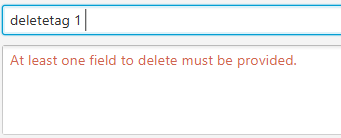
-
deletetag 1 t/friends
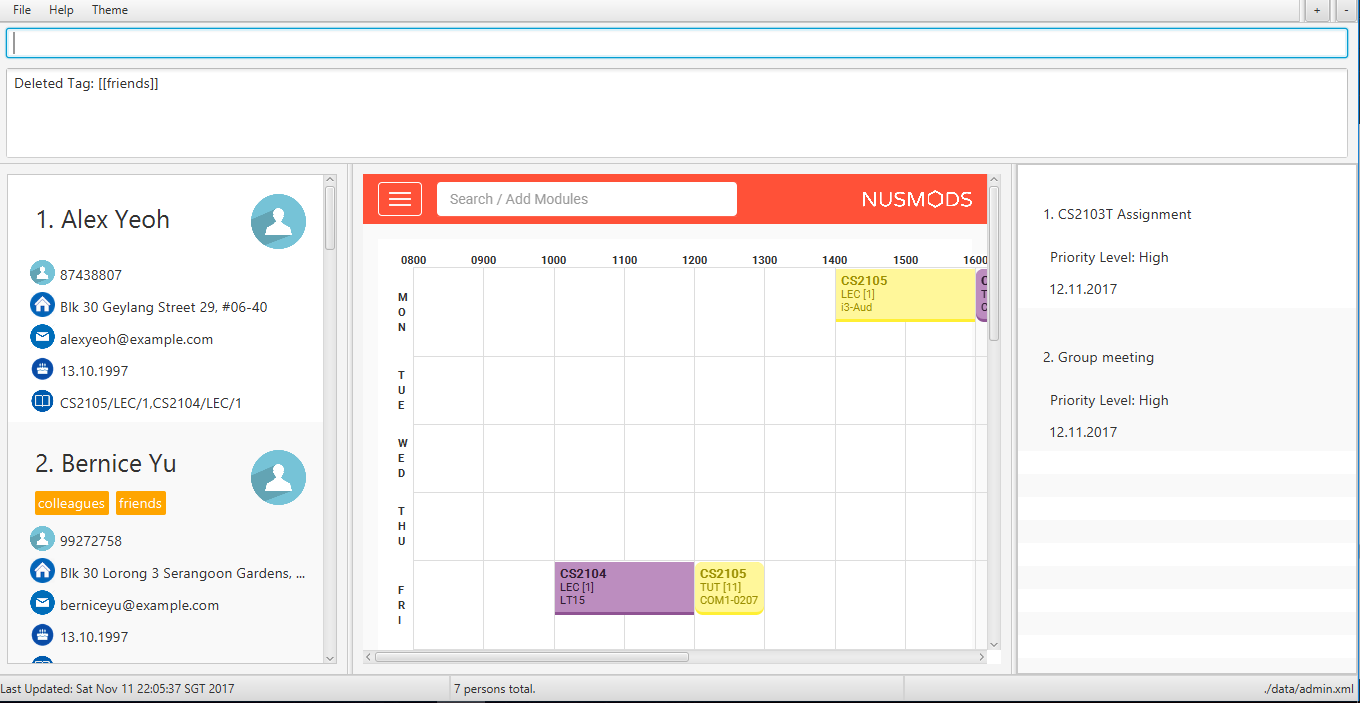
End of Extract
Justification
Currently, the existing tags are unable to be deleted. It can only be done through
the Edit command which is repetitive and exhaustive to re-enter the existing tags and
omit the tag that is to be deleted. Through this function, the user can delete the tag
with ease.
Deleting a person’s tag mechanism
The Deleting a person’s tag mechanism consists of DeleteTagCommand and DeleteTagCommandParser classes.
The DeleteTagCommandParser resides inside LogicManager. DeleteTagCommandParser only deals with Parser. It is created from AddressBookParser. The following diagram shows the flow for parser:
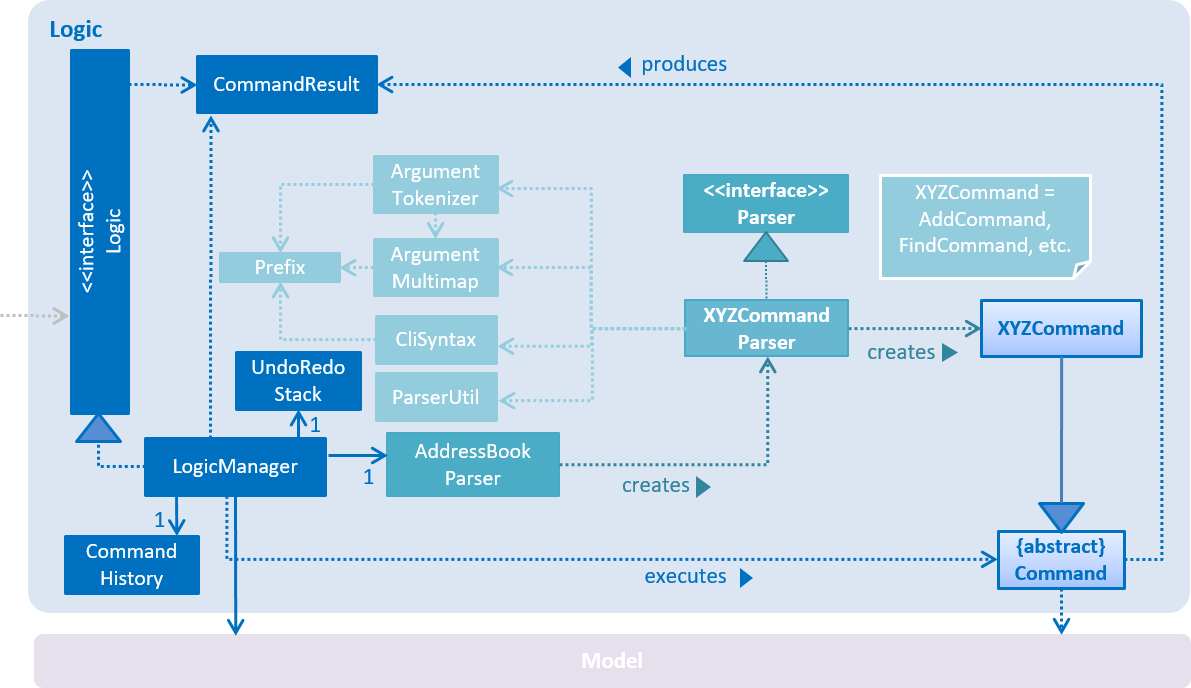
XYZCommand Parser inherits from the Parser interface and is created by the AddressBook Parser as the DeleteTagCommandParser.
The tags are parsed under parseTagsForDelete, while the person index is parsed under parse before execution. The tags are identified by the prefix t/ to be parsed for deletion, and it must be fully matched.
|
The DeleteTagCommand resides inside LogicManager. It supports undoing and redoing of that modifies the state of Weaver. Such commands will inherit from UndoableCommand.
DeleteTagCommand only deals with UndoableCommands. Commands that cannot be undone will inherit from Command instead. The following diagram shows the inheritance diagram for commands:
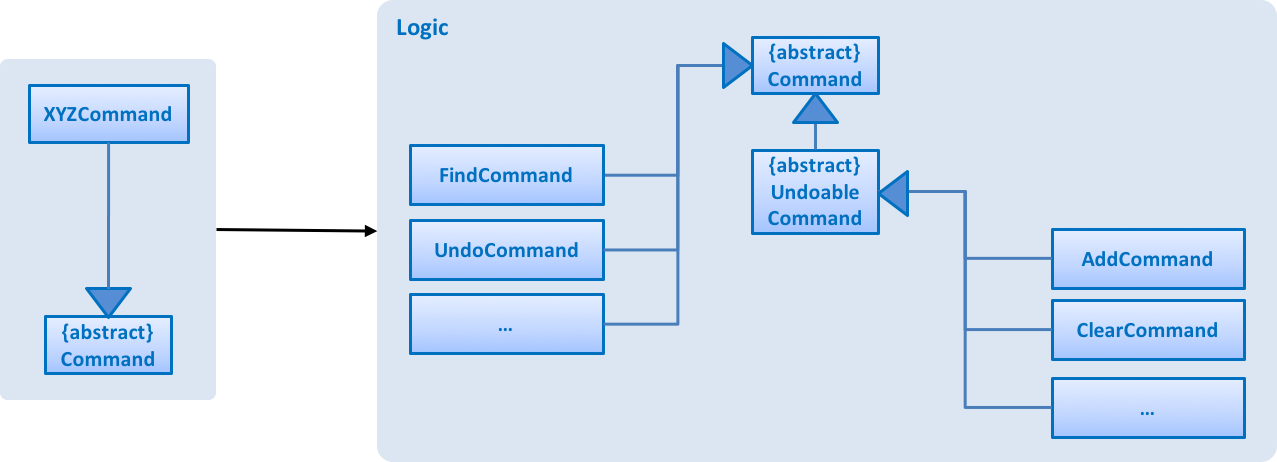
UndoableCommand adds an extra layer between the abstract Command class and concrete commands that can be undone, such as the DeleteTagCommand.
Note that extra tasks need to be done when executing a command in an undoable way, such as saving the state of the address book before execution. UndoableCommand contains the high-level algorithm for those extra tasks while the child classes implements the details of how to execute the specific command.
Note that this technique of putting the high-level algorithm in the parent class and lower-level steps of the algorithm in child classes is also known as the template pattern.
Commands that are not undoable are implemented this way:
public class ListCommand extends Command {
    @Override
    public CommandResult execute() {
        // ... list logic ...
    }
}
With the extra layer, the commands that are undoable are implemented this way:
public abstract class UndoableCommand extends Command {
    @Override
    public CommandResult execute() {
        // ... undo logic ...

        executeUndoableCommand();
    }
}

public class DeleteTagCommand extends UndoableCommand {
    @Override
    public CommandResult executeUndoableCommand() {
        // ... delete logic ...
    }
}
Inside the DeleteTagCommand class, a DeleteTagDescriptor identifying the tags to be deleted will be created from DeleteTagCommandParser, which will create and update a new createTagDeletedPerson accordingly. This will overwrite the existing ReadOnlyPerson Person’s Tags while retaining the rest of its attributes as seen from the Model diagram below.
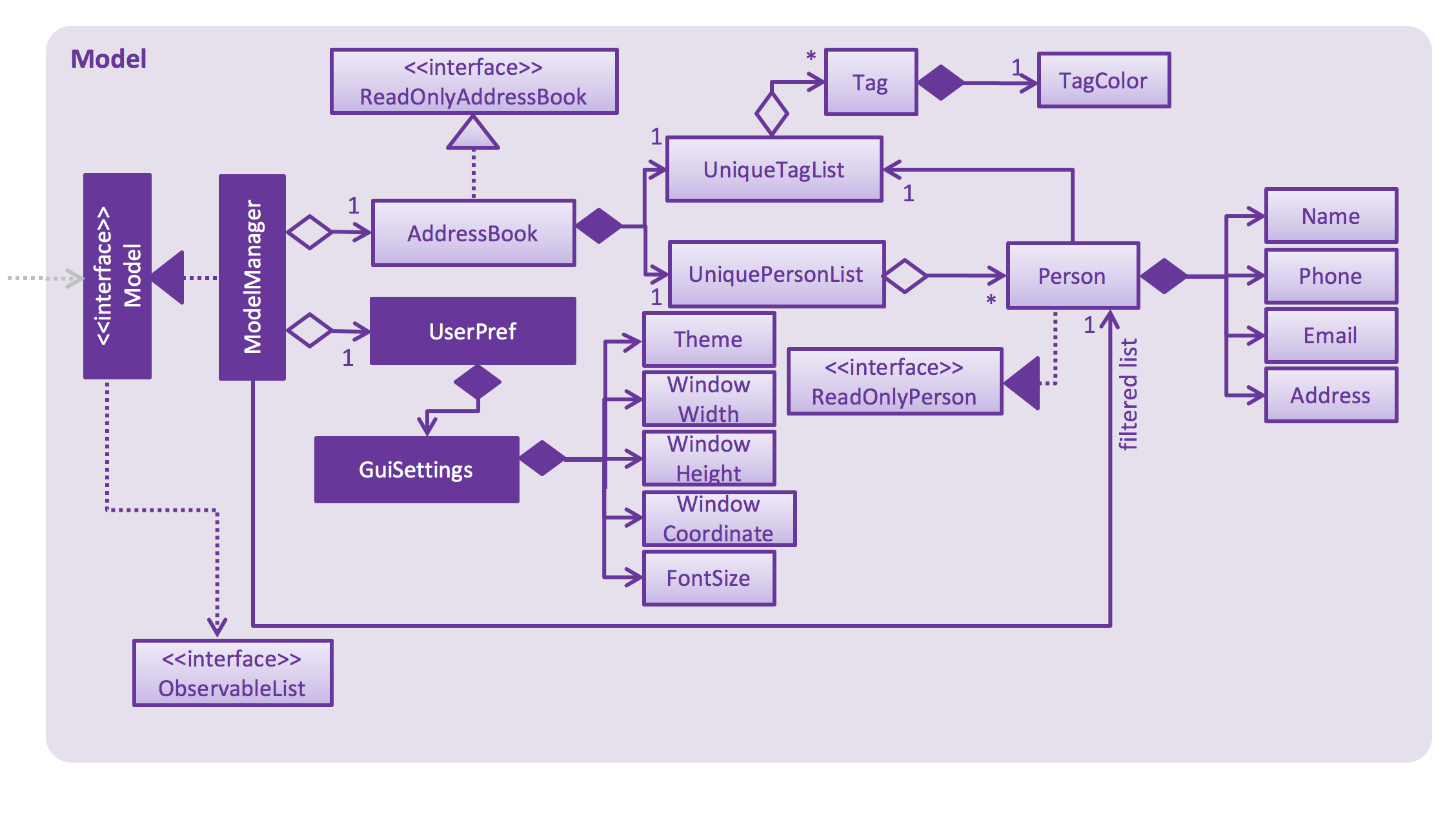
As you can see from the Model diagram, the Person retains the attributes that inherit it except for its own UniqueTagList, which is modified only for that particular Person.
Suppose that the user has just launched the application.
The user executes a new DeleteTagCommand, deletetag 5 t/friends, to delete the tag friends of the 5th person in the address book. The tags and the index are parsed into DeleteTagCommandParser before the deletetag command executes.
As the user continues to use the program, he might decide to delete more than one tags. For example, the user may execute deletetag 2 t/colleagues t/friends to delete multiple tags.
If the tags are not fully matched, it will throw an Exception.
|
The user now decides that deleting the tags was a mistake, and decides to undo that action using undo.
Using the Undo/Redo stack, we will restore the address book to the state before the delete/t command is executed.
If the undoStack is empty, then there are no other commands left to be undone, and an Exception will be thrown when popping the undoStack.
|
Design considerations
Aspect: Implementation of DeleteTagCommand
Alternative 1 (current choice): To access the Person and overwrite a new Person to it.
Pros: It will not lose the same tags for other Person it is now part of the default behaviour. Classes that deal with Tags like UniqueTagsList do not have to be deleted.
Cons: It will be hard for new developers to understand the UniqueTagsList.
Alternative 2: To delete the Tag in the UniqueTagsList
Pros: It does not involve Person model, easier for new developers to understand with less coupling.
Cons: It will defeat the purpose of deleting a tag solely of the specific Person. Might take more effort to organise tags for users.
Aspect: Implementation of DeleteTagCommandParser
Alternative 1 (current choice): To be able to utilise Index and tag prefix t/.
Pros: It will be able to delete multiple tags. It is easy to implement.
Cons: It will pose difficulties for the user. User will have to type additional prefixes to delete.
Alternative 2: To not utilise prefix t/.
Pros: It will be easier and faster to delete with no prefix identifier.
Cons: It will be difficult to implement, as it is harder to tokenize the arguments to differentiate between index and tag.
Aspect: Implementation of deleting only a person’s tags
Alternative 1 (current choice):
To continue to contain the tag in UniqueTagsList even if there are no tags for any Person.
Pros: It will be easy to implement.
Cons: It may have performance issues in terms of memory usage.
Alternative 2: To clean up the UniqueTagsList after deleting its last tag.
Pros: It will use less memory (e.g. for UniqueTagsList, will not contain tags that are not present in any Person).
Cons: It must be ensured that the implementation for discovering the last tags of the list
is correct. It may be harder to implement for new developers.
End of Extract
Locating persons by tag: findtag since v1.2
Finds persons whose tags contain any of the given keywords.
Format: findtag KEYWORD [MORE_KEYWORDS]
Make sure there are no whitespaces between find and tag!
|
Examples:
-
findtag friends
ReturnsJohn DoeandHans Gruber -
findtag friends colleagues
Returns any person having tagsFriendsorColleagues

-
findtag friends
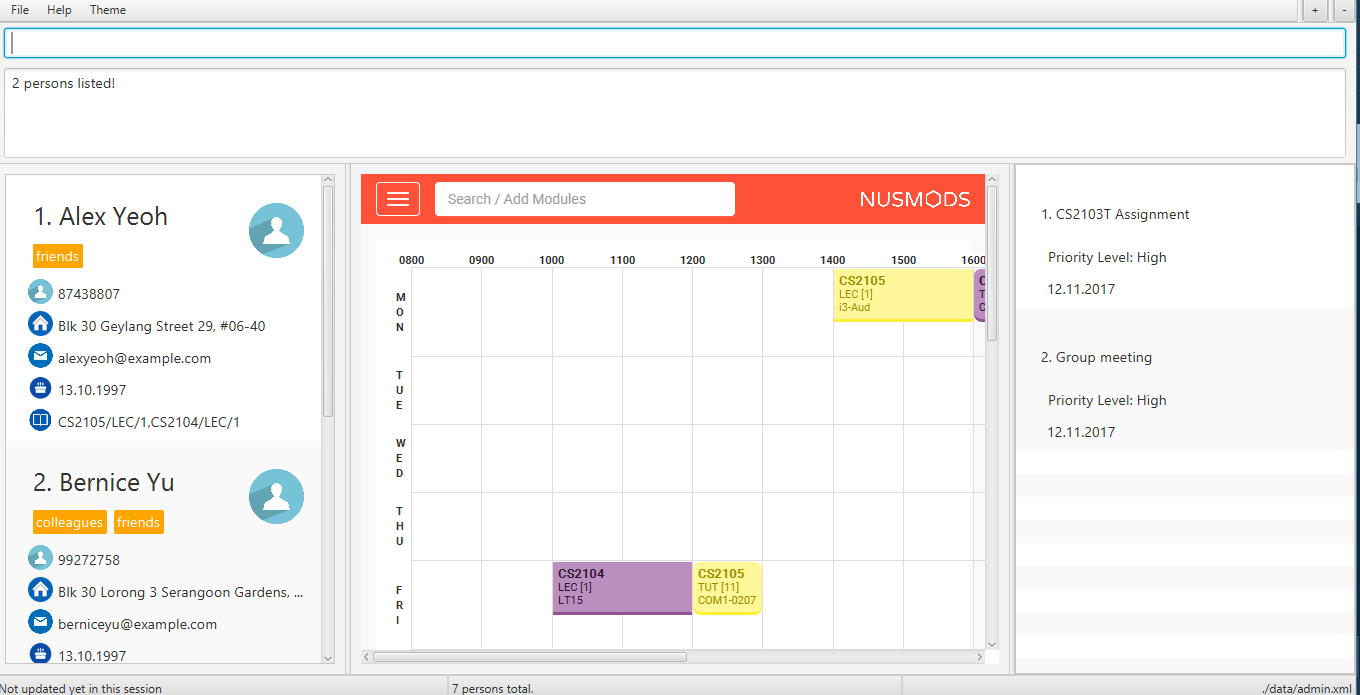
End of Extract
Justification
While Weaver is able to list the addresses, it is unable to allow the user to view based on the tags they created. By locating a person by tag, the user can sort the list and find the tags as a result. This also remove the need for a favourite contact as the user just need to tag the address as "favourite" and find that tag.
Auto-completion since v1.4
The command box has a auto-complete feature to provide suggestions to your commands.
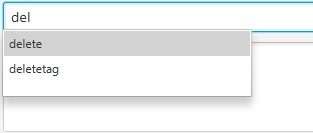
Type any letters to get some suggestions on what command to use.
To avoid accidental auto-completion, you can press ESC to cancel and continue your input.
|
End of Extract
Justification
Typing all the commands out can be a hassle, so this implementation of the auto-complete function allows the user to select frequently used commands with convenience.
Clearing all entries : clear since v1.3
To interact solely with the keyboard, make your selection and press SPACE instead of ENTER!
|
Clears all entries from the address book.
Format: clear
A clear confirmation will pop-up to reaffirm your clear command in the event of accidental clearing.
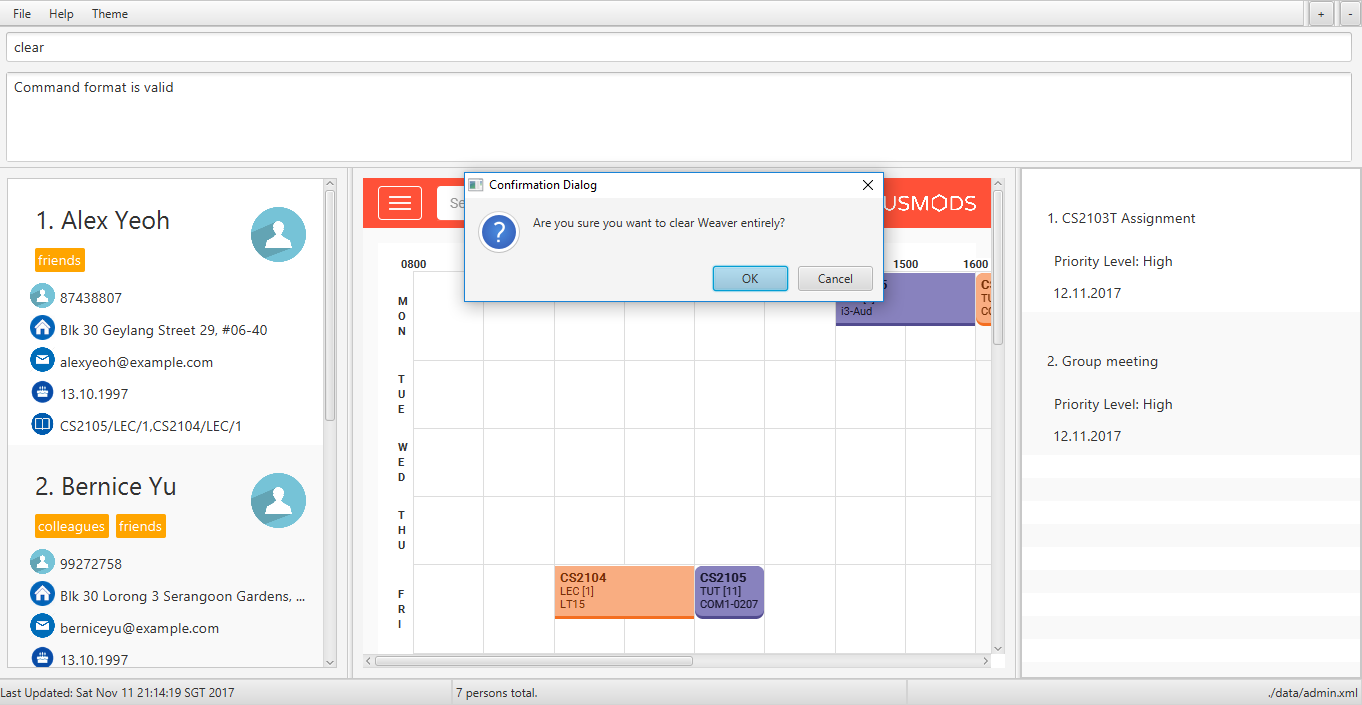
By default, you will be able to confirm clearing by pressing ENTER on the keyboard, or clicking OK.
Otherwise, you can cancel by highlighting the Cancel button with the keyboard followed by the SPACE button.
Alternatively, you can also click the X button or the Cancel button.
Experienced users may be able to bypass the clear confirmation window by its alias:cls
|
End of Extract
Justification
Initially, the clear command can be done in one step. However, new users might not be accustomed to the application. Also, they probably skipped the user guide as well, so are unsure of the undo and redo features. Therefore, they may be alarmed when they clear their contacts. This seeks to remedy this problem by providing a confirmation popup to allow the user the option to consider before clearing their contacts.
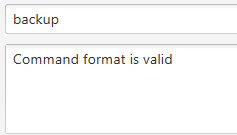
Backing up your Weaver : backup since v1.5
Backup your address book information in Weaver.
Format: backup
-
Back up your address book information in Weaver according to your own accounts.
-
The file will be saved in the /data folder as the following format:
[Account Username]-backup.xml
End of Extract
Justification
While the address book data in Weaver is saved automatically after each changes, a user may want to back up his/her copy just in case. This feature allows the additional functionality to backup in a file that is identifiable to the user.
Enhancement Proposed: Future Implementations
-
These are the enhancements proposed for the future Weaver v2.0 release.
-
It is written as user stories. They are sorted by priorities and arranged in a table below:
Priorities: High (must have) - * * *, Medium (nice to have) - * *, Low (unlikely to have) - *
| Priority | As a … | I want to … | So that I can… |
|---|---|---|---|
|
user |
be notified of birthdays |
send them well wishes |
|
user |
log in |
access privately |
|
user |
customise the display |
view the list to my preference |
|
user |
delete people with a specific tag |
clean up my list |
|
user with frequent contacts |
mark a contact as favourite |
find them easily |
|
user |
see a history bar |
keep track of my previous searches |
|
user |
see random people on the front page |
get in touch with old friends |
|
user |
confirm before clearing |
not clear the contents accidentally |
|
user |
edit a person |
modify an address conveniently |
Other contributions
-
Suggested features to be implemented in the future in the user stories. (Pull request:
#13) -
Helped in reporting bugs for a team’s [CS2103AUG2017-W09-B2] open-sourced software. (Issues:
#119,
#120,
#122),
#124) -
Updated new colors to be included in tags. (Pull request:
#64) -
Fixed global bug for help window. (Issue:
#727) -
Wrote additional tests to increase coverage to 85% (Pull request:
#141)
Project: NUSeekers
A software project in developing an inclusive community
within the National University of Singapore.
It is written in with Meteor, using JavaScript, HTML5, CSS, JSON, and MongoDB.